

How to Make Your Own Anime
You do not need to draw, animate or edit video to make an anime anymore. You need a story, a few characters you care about, and a tool that handles the rest. Here is the whole path, from first idea to a published episode.

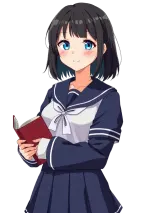
Can you really make your own anime?
Yes. Traditional anime takes a studio: storyboard artists, key animators, background painters, voice actors and an editor. That is why most fan ideas never leave a notebook. Today you can skip the parts that need years of training. You bring the story and the characters; a browser studio gives you finished backgrounds and character art, lets you write the dialogue, and turns your scenes into an episode people can watch. Voices, AI art and more come with paid plans.
-
Shape the idea
Write a one-line premise: who it is about, what they want, and what stands in the way. "A shy archivist discovers the school library is a gate to a spirit world, and the student council wants it sealed." Pick a genre (shonen action, isekai, slice of life, mystery) so every later choice has a direction.
-
Create your characters
Start small: a lead, someone who opposes them, and someone who helps. Give each a name, a look you can describe in one line, a goal and a flaw. Use the free anime name generator for names with meanings, roll ideas with the anime OC generator, and keep every detail on an OC character sheet so the design stays consistent.

-
Write a short first episode
Short beats long: do not plan a whole season yet. Plan a handful of scenes for episode one: a hook in the first scene, a problem, a turning point, and a closing line that makes people want the next episode. Write the dialogue scene by scene and read it out loud. If a line would never be said by a real person, cut it.
-
Set the scenes
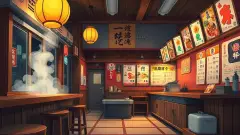
For each scene, choose where it happens, place your characters, and write the dialogue for each line. A rooftop at sunset, a ramen shop, a neon street at night: the background does half the mood work for you. Vary locations between scenes so the episode feels like it moves.
-
Add voices and effects
Voices are where characters come alive. On a paid plan you can give each main character an AI voice that fits their personality, or record your own lines. Save effects for the moments that need them: the first spell, the reveal, the punch that lands. Then play the episode start to finish and trim anything that drags.
-
Publish and keep going
Publish the episode so people can watch it and share the link. Finished beats perfect: the first episode teaches you more than another month of planning. Note what landed and what did not, reuse the locations that worked, and make episode two.
Make your own anime character
If you are here for the character more than the series, start with the look and one strong trait. Anime design reads at a glance, so pick a hair colour and silhouette that nobody else in your cast shares, then add one signature item. When you are ready to see the character in a real scene, cast them in Animaker Cloud: choose from ready-made anime characters, or on a paid plan upload your own character art and let the studio cut out the background.
Questions
Do I need drawing or animation skills?
No. Animaker Cloud gives you ready backgrounds and characters, and you build each scene by choosing, placing and writing. Your job is the story.
Is it free?
Animaker Cloud is free to start, with no card required. Sign in with a QOL ID and you get 3 free AI credits for images and voice lines. Paid plans add daily AI image and voice generation, AI video, premium voices, voice recording and uploading your own characters. See pricing.
Can other people watch what I make?
Yes. Published episodes can be watched by anyone you share them with.
Your first episode is waiting.
Free to start. No animation skills, no editing software, no card required.
Make your own anime